1. 문제 상황
요구사항: 클라이언트에서 비밀번호/PIN 보호
브라우저 환경에서 민감한 데이터를 보호하기 위해 비밀번호나 PIN 기반 인증을 구현해야 할 때가 있습니다. 문제는 비밀번호를 어떻게 안전하게 저장하고 검증할 것인가입니다.
잘못된 접근: 평문 저장
// 절대 하면 안 되는 방법!
localStorage.setItem('password', 'mysecret123');

// 검증
if (localStorage.getItem('password') === userInput) {
  // 인증 성공
}
문제점:
- 개발자 도구에서 즉시 노출
- XSS 공격 시 탈취 가능
- 로컬 백업/동기화 시 평문 유출
기본적인 해결: 해시 저장
비밀번호 자체가 아닌 해시값만 저장하면 원본을 알 수 없습니다.
// 해시만 저장
const hash = await sha256(password);
localStorage.setItem('passwordHash', hash);

// 검증: 입력값을 해싱해서 비교
const inputHash = await sha256(userInput);
if (inputHash === storedHash) {
  // 인증 성공
}
하지만 단순 SHA-256 해싱에도 한계가 있습니다.
2. SHA-256 단독 해싱의 한계
SHA-256 기본 구현
async function sha256(message) {
  const encoder = new TextEncoder();
  const data = encoder.encode(message);

  // SHA-256 해시 계산
  const hashBuffer = await crypto.subtle.digest('SHA-256', data);

  // Base64로 변환
  const hashArray = new Uint8Array(hashBuffer);
  return btoa(String.fromCharCode(...hashArray));
}

// 사용
const hash = await sha256('password123');
// "pmWkWSBCL51Bfkhn79xPuKBKHz//H6B+mY6G9/eieuM="
왜 SHA-256만으로는 부족한가?
1. 속도가 너무 빠름
SHA-256은 데이터 무결성 검증용으로 설계되어 매우 빠릅니다. 이것이 비밀번호 해싱에서는 약점이 됩니다.
// 일반 PC에서 SHA-256 성능
// 초당 수백만 ~ 수천만 회 해싱 가능

// 4자리 PIN의 경우: 0000 ~ 9999 = 10,000 가지
// SHA-256으로 전수조사: 1ms 이하에 완료!
2. 레인보우 테이블 공격
미리 계산된 해시-평문 매핑 테이블을 사용한 역추적 가능:
// 같은 비밀번호는 항상 같은 해시
sha256('password123')  // 항상 동일한 해시값
sha256('password123')  // 레인보우 테이블에서 조회 가능!
3. Salt 없는 해싱의 취약점
// 여러 사용자가 같은 비밀번호를 쓰면 해시도 동일
userA.hash === userB.hash  // 둘 다 'password123' 사용 시 true
// → 한 명의 비밀번호가 노출되면 다른 사용자도 위험
3. PBKDF2로 보안 강화하기
PBKDF2란?
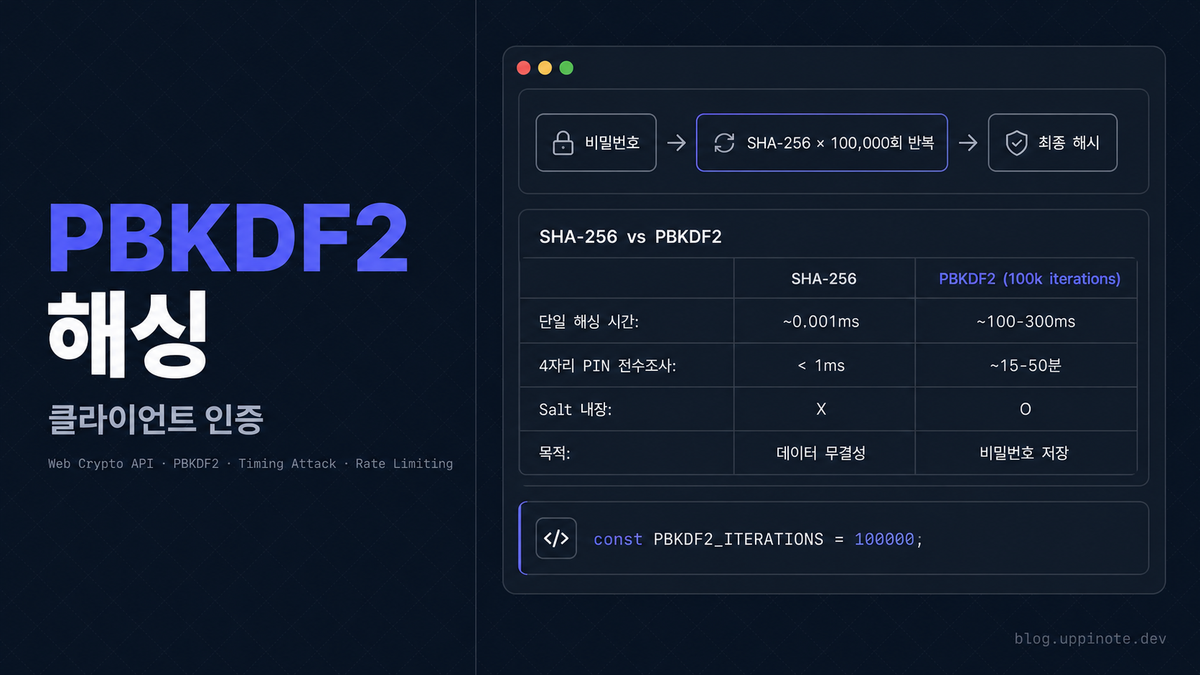
PBKDF2 (Password-Based Key Derivation Function 2)는 비밀번호 해싱에 특화된 알고리즘입니다.
핵심 개념: 의도적으로 느리게 만들기
비밀번호 → [SHA-256 × 100,000회 반복] → 최종 해시
- 한 번 계산에 수백 ms 소요
- 브루트포스 공격 시간이 기하급수적으로 증가
- GPU 병렬 공격에도 저항성 있음
Web Crypto API로 PBKDF2 구현
// PBKDF2 설정 상수
const PBKDF2_ITERATIONS = 100000;  // 반복 횟수

async function pbkdf2Hash(password, saltB64, iterations = PBKDF2_ITERATIONS) {
  const enc = new TextEncoder();

  // Base64 salt를 Uint8Array로 변환
  const salt = Uint8Array.from(atob(saltB64), c => c.charCodeAt(0));

  // 1. 비밀번호를 키 재료(key material)로 가져오기
  const keyMaterial = await crypto.subtle.importKey(
    'raw',
    enc.encode(password),
    'PBKDF2',
    false,
    ['deriveBits']
  );

  // 2. PBKDF2로 키 도출
  const bits = await crypto.subtle.deriveBits(
    {
      name: 'PBKDF2',
      salt: salt,
      iterations: iterations,  // 핵심: 반복 횟수
      hash: 'SHA-256',
    },
    keyMaterial,
    256  // 256비트(32바이트) 출력
  );

  // 3. Base64로 인코딩하여 반환
  return btoa(String.fromCharCode(...new Uint8Array(bits)));
}
Salt 생성
function generateSalt() {
  const arr = new Uint8Array(16);  // 128비트
  crypto.getRandomValues(arr);     // 암호학적 난수
  return btoa(String.fromCharCode(...arr));
}

// 사용
const salt = generateSalt();
// "Kx7mNp2qR4sT6vW8yZ1aBC==" (매번 다름)
중요: Math.random() 대신 반드시 crypto.getRandomValues()를 사용해야 합니다.
// 예측 가능한 난수 - 보안 용도 부적합
Math.random()  // PRNG (Pseudo-Random Number Generator)

// 암호학적으로 안전한 난수
crypto.getRandomValues()  // CSPRNG (Cryptographically Secure PRNG)
비밀번호 설정과 검증
// 비밀번호 설정
async function setPassword(password) {
  const salt = generateSalt();
  const hash = await pbkdf2Hash(password, salt);

  // salt와 hash를 함께 저장 (iterations도 저장하면 나중에 업그레이드 가능)
  return {
    saltB64: salt,
    hashB64: hash,
    iterations: PBKDF2_ITERATIONS
  };
}

// 비밀번호 검증
async function verifyPassword(inputPassword, stored) {
  const { saltB64, hashB64, iterations } = stored;

  // 저장된 salt와 iterations로 입력값 해싱
  const inputHash = await pbkdf2Hash(inputPassword, saltB64, iterations);

  // 해시 비교
  return inputHash === hashB64;
}
SHA-256 vs PBKDF2 비교
| 항목 | SHA-256 | PBKDF2 (100k iterations) |
|---|---|---|
| 단일 해싱 시간 | ~0.001ms | ~100-300ms |
| 4자리 PIN 전수조사 | < 1ms | ~15-50분 |
| 6자리 비밀번호 | < 100ms | ~수 시간 |
| Salt 내장 | X | O |
| 목적 | 데이터 무결성 | 비밀번호 저장 |
4. Timing Attack 방어
Timing Attack이란?
문자열 비교 시 실행 시간의 차이를 분석하여 정보를 추출하는 공격입니다.
// 취약한 문자열 비교
function unsafeCompare(a, b) {
  if (a.length !== b.length) return false;

  for (let i = 0; i < a.length; i++) {
    if (a[i] !== b[i]) return false;  // 첫 불일치에서 즉시 반환
  }
  return true;
}
문제점:
- 첫 글자가 틀리면 빠르게 반환
- 마지막 글자만 틀리면 느리게 반환
- 이 시간 차이를 측정하여 한 글자씩 추측 가능
"aXXXXXXX" 해시 비교 → 빠름 (첫 글자 불일치)
"AaXXXXXX" 해시 비교 → 조금 느림 (두 번째 글자에서 불일치)
"AaxXXXXX" 해시 비교 → 더 느림 (세 번째 글자에서 불일치)
... 반복하면 전체 해시 추측 가능
Constant-Time 비교 구현
모든 경우에 동일한 시간이 걸리도록 비교합니다:
function constantTimeCompare(a, b) {
  // 타입 체크
  if (typeof a !== 'string' || typeof b !== 'string') {
    return false;
  }

  // 길이가 달라도 전체 비교를 수행
  const maxLen = Math.max(a.length, b.length);
  let result = a.length !== b.length ? 1 : 0;  // 길이 다르면 이미 불일치

  for (let i = 0; i < maxLen; i++) {
    const charA = i < a.length ? a.charCodeAt(i) : 0;
    const charB = i < b.length ? b.charCodeAt(i) : 0;
    result |= charA ^ charB;  // XOR 후 OR (불일치 시 비트가 세팅됨)
  }

  return result === 0;
}
핵심 포인트:
- 길이와 무관하게 전체 순회:
maxLen까지 항상 반복 - 비트 연산으로 결과 누적:
result |= charA ^ charB - 조기 반환 없음: 모든 문자를 비교한 후에만 결과 반환
검증 함수에 적용
async function verifyPassword(inputPassword, stored) {
  const { saltB64, hashB64, iterations } = stored;
  const inputHash = await pbkdf2Hash(inputPassword, saltB64, iterations);

  // 일반 비교 대신 constant-time 비교 사용
  return constantTimeCompare(inputHash, hashB64);
}
5. Rate Limiting 구현
클라이언트 Rate Limiting의 필요성
서버 없이 클라이언트만으로 동작하는 환경에서도 브루트포스 공격을 방어해야 합니다.
// Rate Limiting 설정
const MAX_ATTEMPTS = 5;           // 최대 시도 횟수
const LOCKOUT_DURATION_MS = 30000;  // 잠금 시간 (30초)
시도 횟수 추적
// 시도 기록 조회
async function getAttempts() {
  const data = await chrome.storage.session.get('attempts');
  return data.attempts || { count: 0, lockedUntil: 0 };
}

// 시도 기록 저장
async function setAttempts(attempts) {
  await chrome.storage.session.set({ attempts });
}

// 시도 횟수 증가
async function incrementAttempts() {
  const attempts = await getAttempts();
  attempts.count += 1;

  // 최대 시도 횟수 초과 시 잠금
  if (attempts.count >= MAX_ATTEMPTS) {
    attempts.lockedUntil = Date.now() + LOCKOUT_DURATION_MS;
  }

  await setAttempts(attempts);
  return attempts;
}

// 시도 기록 초기화
async function resetAttempts() {
  await setAttempts({ count: 0, lockedUntil: 0 });
}
Rate Limiting이 적용된 검증
async function verifyPasswordWithRateLimit(inputPassword, stored) {
  const attempts = await getAttempts();

  // 1. 잠금 상태 확인
  if (attempts.lockedUntil > Date.now()) {
    const remaining = Math.ceil((attempts.lockedUntil - Date.now()) / 1000);
    return {
      success: false,
      error: 'locked',
      retryAfter: remaining,
      message: `${remaining}초 후에 다시 시도해주세요.`
    };
  }

  // 잠금 시간이 지났으면 초기화
  if (attempts.count >= MAX_ATTEMPTS && attempts.lockedUntil <= Date.now()) {
    await resetAttempts();
  }

  // 2. 비밀번호 검증
  const { saltB64, hashB64, iterations } = stored;
  const inputHash = await pbkdf2Hash(inputPassword, saltB64, iterations);
  const isValid = constantTimeCompare(inputHash, hashB64);

  // 3. 결과에 따른 처리
  if (isValid) {
    await resetAttempts();  // 성공 시 초기화
    return { success: true };
  } else {
    const newAttempts = await incrementAttempts();
    const remaining = MAX_ATTEMPTS - newAttempts.count;

    if (newAttempts.lockedUntil > Date.now()) {
      return {
        success: false,
        error: 'locked',
        retryAfter: Math.ceil(LOCKOUT_DURATION_MS / 1000),
        message: `비밀번호가 틀렸습니다. ${LOCKOUT_DURATION_MS / 1000}초 동안 잠금됩니다.`
      };
    }

    return {
      success: false,
      error: 'invalid',
      remainingAttempts: remaining,
      message: `비밀번호가 틀렸습니다. ${remaining}회 남음.`
    };
  }
}
용도별 Rate Limiting 분리
인증과 비밀번호 변경에 별도의 카운터를 사용하면 더 안전합니다:
// 용도별 키
const ATTEMPT_KEYS = {
  unlock: 'unlockAttempts',
  change: 'changeAttempts'
};

async function getAttempts(purpose = 'unlock') {
  const key = ATTEMPT_KEYS[purpose] || ATTEMPT_KEYS.unlock;
  const data = await chrome.storage.session.get(key);
  return data[key] || { count: 0, lockedUntil: 0 };
}

async function setAttempts(attempts, purpose = 'unlock') {
  const key = ATTEMPT_KEYS[purpose] || ATTEMPT_KEYS.unlock;
  await chrome.storage.session.set({ [key]: attempts });
}
분리의 이점:
- 잠금 해제 시도가 비밀번호 변경에 영향 없음
- 각 용도별로 독립적인 보안 정책 적용 가능
- 공격 벡터 분리
6. 완전한 구현 예시
핵심 유틸리티
// ============================================
// Constants
// ============================================
const PBKDF2_ITERATIONS = 100000;
const MAX_ATTEMPTS = 5;
const LOCKOUT_DURATION_MS = 30 * 1000;  // 30초

// ============================================
// Cryptographic Utilities
// ============================================

// 암호학적으로 안전한 Salt 생성
function generateSalt() {
  const arr = new Uint8Array(16);
  crypto.getRandomValues(arr);
  return btoa(String.fromCharCode(...arr));
}

// PBKDF2 해싱
async function pbkdf2Hash(password, saltB64, iterations = PBKDF2_ITERATIONS) {
  const enc = new TextEncoder();
  const salt = Uint8Array.from(atob(saltB64), c => c.charCodeAt(0));

  const keyMaterial = await crypto.subtle.importKey(
    'raw',
    enc.encode(password),
    'PBKDF2',
    false,
    ['deriveBits']
  );

  const bits = await crypto.subtle.deriveBits(
    {
      name: 'PBKDF2',
      salt: salt,
      iterations: iterations,
      hash: 'SHA-256',
    },
    keyMaterial,
    256
  );

  return btoa(String.fromCharCode(...new Uint8Array(bits)));
}

// Constant-time 문자열 비교
function constantTimeCompare(a, b) {
  if (typeof a !== 'string' || typeof b !== 'string') return false;

  const maxLen = Math.max(a.length, b.length);
  let result = a.length !== b.length ? 1 : 0;

  for (let i = 0; i < maxLen; i++) {
    const charA = i < a.length ? a.charCodeAt(i) : 0;
    const charB = i < b.length ? b.charCodeAt(i) : 0;
    result |= charA ^ charB;
  }

  return result === 0;
}
비밀번호 관리 API
// ============================================
// Password Management API
// ============================================

// 비밀번호 설정
async function setPassword(password) {
  const saltB64 = generateSalt();
  const hashB64 = await pbkdf2Hash(password, saltB64);

  const meta = {
    saltB64,
    hashB64,
    iterations: PBKDF2_ITERATIONS,
    createdAt: Date.now()
  };

  await chrome.storage.local.set({ passwordMeta: meta });
  return { success: true };
}

// 비밀번호 변경
async function changePassword(currentPassword, newPassword) {
  // 1. 현재 비밀번호 검증
  const verifyResult = await verifyPasswordWithRateLimit(
    currentPassword,
    await getPasswordMeta(),
    'change'  // 별도 rate limit
  );

  if (!verifyResult.success) {
    return verifyResult;
  }

  // 2. 새 비밀번호 설정 (새 salt 생성)
  return await setPassword(newPassword);
}

// 비밀번호 검증 (Rate Limiting 포함)
async function verifyPasswordWithRateLimit(password, meta, purpose = 'unlock') {
  if (!meta) {
    return { success: false, error: 'no-password-set' };
  }

  const attempts = await getAttempts(purpose);

  // 잠금 상태 확인
  if (attempts.lockedUntil > Date.now()) {
    const remaining = Math.ceil((attempts.lockedUntil - Date.now()) / 1000);
    return {
      success: false,
      error: 'locked',
      retryAfter: remaining
    };
  }

  // 잠금 해제
  if (attempts.count >= MAX_ATTEMPTS) {
    await resetAttempts(purpose);
  }

  // 검증
  const inputHash = await pbkdf2Hash(password, meta.saltB64, meta.iterations);
  const isValid = constantTimeCompare(inputHash, meta.hashB64);

  if (isValid) {
    await resetAttempts(purpose);
    return { success: true };
  } else {
    const newAttempts = await incrementAttempts(purpose);
    return {
      success: false,
      error: newAttempts.lockedUntil > Date.now() ? 'locked' : 'invalid',
      remainingAttempts: Math.max(0, MAX_ATTEMPTS - newAttempts.count),
      retryAfter: newAttempts.lockedUntil > Date.now()
        ? Math.ceil(LOCKOUT_DURATION_MS / 1000)
        : null
    };
  }
}
7. Before/After 비교
Before: 취약한 구현
// 취약점 1: 단순 SHA-256 (빠른 브루트포스 가능)
async function hashPassword(password) {
  const hash = await crypto.subtle.digest(
    'SHA-256',
    new TextEncoder().encode(password)
  );
  return btoa(String.fromCharCode(...new Uint8Array(hash)));
}

// 취약점 2: Salt 없음 (레인보우 테이블 공격 가능)
const stored = {
  hash: await hashPassword(password)
  // salt 없음!
};

// 취약점 3: 일반 문자열 비교 (Timing Attack 가능)
function verify(input) {
  const inputHash = await hashPassword(input);
  return inputHash === stored.hash;  // 취약!
}

// 취약점 4: Rate Limiting 없음 (무제한 시도 가능)
After: 안전한 구현
// 개선 1: PBKDF2 (100,000회 반복으로 브루트포스 방어)
const hash = await pbkdf2Hash(password, salt, 100000);

// 개선 2: 랜덤 Salt (레인보우 테이블 무력화)
const stored = {
  saltB64: generateSalt(),
  hashB64: hash,
  iterations: 100000
};

// 개선 3: Constant-time 비교 (Timing Attack 방어)
const isValid = constantTimeCompare(inputHash, stored.hashB64);

// 개선 4: Rate Limiting (5회 실패 시 30초 잠금)
const result = await verifyPasswordWithRateLimit(input, stored);
8. 보안 체크리스트
필수 구현 사항
| 항목 | 설명 | 상태 |
|---|---|---|
| PBKDF2 해싱 | 단순 SHA-256 대신 PBKDF2 사용 | 필수 |
| Salt 사용 | crypto.getRandomValues()로 생성 | 필수 |
| Constant-time 비교 | Timing Attack 방어 | 필수 |
| Rate Limiting | 시도 횟수 제한 | 필수 |
| Iterations 저장 | 나중에 업그레이드 가능하도록 | 권장 |
저장 데이터 구조
// 권장 저장 형식
{
  "passwordMeta": {
    "saltB64": "Kx7mNp2qR4sT6vW8yZ1aBC==",
    "hashB64": "A6xnQhbz4Vx2HuGl4lXwZ5U2I8iziLRFnhP5eNfIRvQ=",
    "iterations": 100000,
    "createdAt": 1706000000000
  }
}

// Session 저장 (브라우저 종료 시 삭제)
{
  "unlockAttempts": { "count": 2, "lockedUntil": 0 },
  "changeAttempts": { "count": 0, "lockedUntil": 0 }
}
9. FAQ
Q: PBKDF2 iterations는 얼마가 적당한가요?
A: OWASP 권장은 최소 310,000회 (SHA-256 기준, 2023년)입니다. 하지만 클라이언트 환경과 UX를 고려해 100,000회 정도가 현실적인 선택입니다. 중요한 것은 iterations 값을 저장해두어 나중에 업그레이드할 수 있게 하는 것입니다.
// 저장된 iterations 값을 사용하여 검증
const hash = await pbkdf2Hash(password, stored.saltB64, stored.iterations);
Q: bcrypt나 Argon2를 쓰면 안 되나요?
A: bcrypt와 Argon2는 더 강력하지만, 브라우저 네이티브 Web Crypto API에서 지원하지 않습니다. 외부 라이브러리를 추가해야 하며, 번들 크기와 유지보수 부담이 생깁니다. Web Crypto API의 PBKDF2가 브라우저 환경에서 가장 현실적인 선택입니다.
Q: constant-time 비교가 정말 필요한가요?
A: 네트워크를 통한 원격 Timing Attack은 노이즈가 많아 어렵지만, 같은 기기에서의 로컬 공격이나 사이드 채널 공격에는 여전히 취약할 수 있습니다. 구현 비용이 낮으므로 항상 적용하는 것이 좋습니다.
Q: 클라이언트 Rate Limiting은 우회 가능하지 않나요?
A: 맞습니다. 로컬 스토리지를 직접 조작하면 우회 가능합니다. 하지만:
- 일반 사용자의 실수로 인한 잠금 방지
- 자동화된 스크립트 공격 지연
- Defense in depth (다층 방어)의 한 레이어
서버가 있다면 서버 측 Rate Limiting과 함께 사용해야 합니다.
Q: crypto.subtle은 HTTPS에서만 동작하나요?
A: 일반 웹페이지에서는 HTTPS 또는 localhost에서만 동작합니다. 하지만 크롬 확장이나 Electron 앱에서는 chrome-extension:// 프로토콜이 보안 컨텍스트로 간주되어 정상 동작합니다.
10. 참고 자료
- MDN: Web Crypto API
- MDN: SubtleCrypto.deriveBits()
- OWASP: Password Storage Cheat Sheet
- Timing Attacks on Web Privacy
- RFC 8018: PKCS #5 (PBKDF2)