1. 문제 상황
B2B SaaS에 관리자가 Trial을 부여하는 기능을 추가하던 중이었습니다. 요구사항은 이렇습니다.
- 플랫폼 관리자가 특정 회사에 "Basic 플랜 30일 무료 체험"을 임의로 부여 가능
- Trial 기간 동안 해당 회사는 Basic 플랜 기능을 모두 사용
- Trial 기간 중에도 사용자가 자발적으로 Starter·Standard 등을 구독할 수 있어야 함
- Trial 만료 시 사용자가 원래 쓰던 플랜(또는 Free)으로 복귀
- 관리자가 Trial을 중도 취소하면 남은 일수를 기존 구독의 결제 주기에 보상
초기 구현은 가장 단순한 접근이었습니다. "Subscription의 planId를 Basic으로 바꾼다." 이 한 줄이 모든 걸 해결해줄 것 같았습니다.
처음 해본 구현
// ❌ Before: planId를 덮어쓰는 방식
async function grantTrial(
  companyId: string,
  trialPlanName: string,
  trialDays: number
) {
  const plan = await prisma.plan.findUnique({ where: { name: trialPlanName } });

  await prisma.subscription.update({
    where: { companyId },
    data: {
      planId: plan.id, // ← Basic으로 덮어쓰기
      status: 'TRIALING',
      trialEnd: addDays(new Date(), trialDays),
    },
  });
}
개발 환경에서는 그럭저럭 돌아갔습니다. 그런데 운영 시나리오를 하나씩 밟아보는 순간 균열이 터지기 시작했습니다.
균열 시나리오 A: 기존 구독 사용자에게 Trial
A 회사는 이미 Starter(월 4,900원)를 쓰고 있습니다. 관리자가 "Basic 30일 무료 체험"을 부여합니다. Trial 만료 후 이 회사는 어떤 플랜으로 돌아가야 할까요? 당연히 Starter입니다. 그런데 planId를 Basic으로 덮어쓴 순간 "원래 Starter였다"는 정보가 사라졌습니다.
"트랜잭션 전에 기존 planId를 어딘가 저장해두면 되지 않나?" 그러면 별도의 previousPlanId 필드가 필요하고, 저장·복원 로직이 어지러워집니다. 게다가 Trial 중에 사용자가 또 플랜을 바꾸면 previousPlanId는 언제 갱신해야 할까요?
균열 시나리오 B: Trial 중 결제
B 회사는 Free 플랜으로 시작해서 Basic Trial을 받았습니다. Trial 15일차에 사용자가 "이 기능 좋네요, 그냥 정식 결제할게요"라며 Standard를 구독합니다. 이 시점의 Subscription은 어떤 상태여야 할까요?
planId = Standard(새로 구독한 플랜)로 바꾼다면?- 그럼 Trial의 Basic 기능 접근은 어떻게 유지하지?
- Trial 만료는 언제 처리하지? (이미 Standard로 결제됐는데 "Trial 만료"가 의미 있나?)
"status: 'TRIALING'으로 두면서 planId는 Standard"도 답이 아닙니다. TRIALING 상태는 "아직 결제 안 된" 의미인데 이미 결제가 된 상태이니 논리적으로 모순입니다.
균열 시나리오 C: Trial 중도 취소
C 회사는 Starter 사용자입니다. Basic Trial 30일 중 15일만 사용한 시점에 관리자가 "그만" 하고 Trial을 취소합니다. 이때 요구사항은 "남은 15일을 기존 결제 주기에 보너스로 얹어준다"입니다. 즉, Starter 결제 주기를 15일 연장합니다.
문제는 "기존 결제 주기가 언제부터 언제까지였는지" 를 알아야 한다는 점입니다. Trial을 시작할 때 기존 Starter 구독의 currentPeriodEnd를 유지했어야 하는데, planId를 덮어쓰는 과정에서 Starter와의 연결이 끊어졌습니다. currentPeriodEnd는 여전히 같은 날짜를 가리키지만 "무엇의 주기"인지가 불명확해졌습니다.
공통 원인
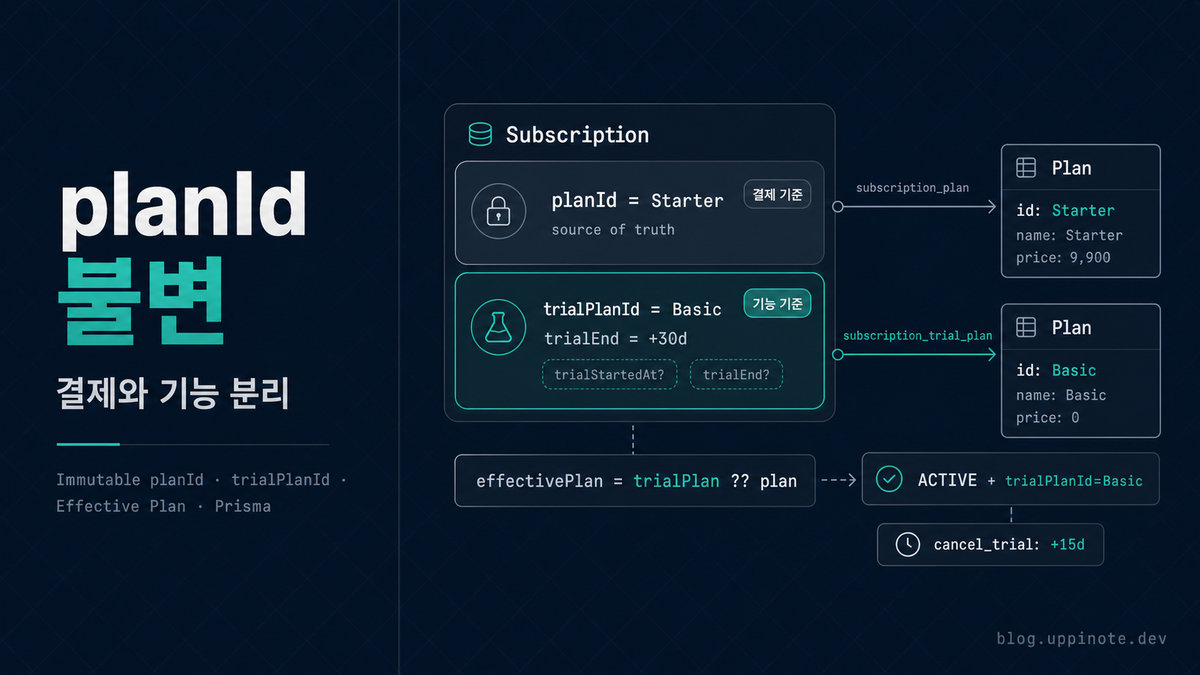
세 시나리오 모두 같은 근본 문제입니다. Subscription.planId는 "사용자가 실제로 지불하는 플랜"이라는 단일한 의미를 가져야 합니다. Trial은 "일시적으로 기능을 덧붙이는" 개념인데, 이걸 같은 필드에 우겨 넣으면 의미가 섞입니다.
2. 원인 분석
2.1 도메인 언어 정리
문제 해결의 첫 단계는 명확한 단어를 쓰는 것입니다. 개발 초기에는 "Trial"과 "구독"을 한 단어로 섞어 쓰고 있었는데, 둘은 완전히 다른 개념입니다.
| 개념 | 의미 | 결제 여부 | 만료 시 |
|---|---|---|---|
| 구독(Subscription) | 사용자가 선택하고 결제하는 플랜 | 있음 | 다음 주기 자동 결제 |
| Trial | 관리자가 일시적으로 부여하는 기능 덧칠 | 없음 | 덧칠 제거, 구독은 그대로 |
Trial은 "구독의 한 종류"가 아니라 "구독 위에 얹힌 임시 레이어" 입니다. 같은 엔티티에 담되 서로 다른 필드로 표현해야 합니다.
2.2 필드 분리 설계
필드를 두 벌로 나눕니다.
planId: 사용자가 결제하는 플랜의 ID. 항상 불변의 source of truth.trialPlanId: Trial로 덧칠된 플랜의 ID. nullable.trialEnd: Trial 만료 시각. nullable.trialStartedAt: Trial 시작 시각. nullable, 취소 시 남은 일수 계산용.
// prisma/schema.prisma
model Subscription {
  id                  String              @id @default(cuid())
  companyId           String              @unique
  planId              String              // ← source of truth (불변)
  status              SubscriptionStatus
  billingCycle        BillingCycle
  currentPeriodStart  DateTime
  currentPeriodEnd    DateTime

  // ↓↓↓ Trial 필드 (nullable)
  trialPlanId         String?             // ← 덧칠된 플랜
  trialStartedAt      DateTime?
  trialEnd            DateTime?

  // 결제·기타 필드 (생략)
  pgScheduleId        String?
  paymentMethod       PaymentMethod?

  // 관계
  plan                Plan                @relation("subscription_plan", fields: [planId], references: [id])
  trialPlan           Plan?               @relation("subscription_trial_plan", fields: [trialPlanId], references: [id])

  @@index([trialPlanId])
}

model Plan {
  // ...
  subscriptions        Subscription[]  @relation("subscription_plan")
  trialSubscriptions   Subscription[]  @relation("subscription_trial_plan") // ← 역관계
}
한 Subscription이 Plan을 두 가지 역할로 참조합니다. Prisma의 @relation("name")으로 이름 충돌을 피합니다.
2.3 Feature Gate 로직: trialPlanId 우선 적용
기능 접근 판단은 "어떤 플랜으로 볼 것인가?"로 귀결됩니다. 여기서 effective plan 개념이 등장합니다.
effectivePlan =
  (trial이 유효하면 trialPlan) 아니면 (실제 구독 plan)
Trial이 유효한 조건은 세 가지 모두 만족할 때입니다.
trialPlanId가 null이 아님trialPlan관계가 로드되어 있음(참조 유효)trialEnd가 현재 시각보다 미래
// lib/domain/billing/access.ts (발췌)
export async function getFeatureAccess(companyId: string): Promise<FeatureAccess> {
  const [subscription, freePlan, memberCount] = await Promise.all([
    prisma.subscription.findUnique({
      where: { companyId },
      include: {
        plan: true,
        trialPlan: true, // ← 두 관계 모두 로드
        pendingPlan: { select: { name: true, displayName: true } },
        paymentMethod: {
          select: { id: true, cardBrand: true, cardLast4: true, cardExpiry: true },
        },
      },
    }),
    prisma.plan.findUnique({ where: { name: FREE_PLAN_NAME } }),
    prisma.member.count({ where: { companyId, status: 'ACTIVE' } }),
  ]);

  if (!freePlan) {
    throw new Error('Free plan not found in database. Run prisma db seed.');
  }

  // 구독이 없는 회사는 Free 기본
  const basePlan = subscription?.plan ?? freePlan;

  // trial이 유효한지 판단 (3가지 조건 모두 만족)
  const trialPlan =
    subscription?.trialPlanId &&
    subscription.trialPlan &&
    subscription.trialEnd &&
    subscription.trialEnd > new Date()
      ? subscription.trialPlan
      : null;

  // 덧칠된 플랜이 있으면 그것을 effective plan으로
  const effectivePlan = trialPlan ?? basePlan;

  const validatedFeatures = validateFeatures(effectivePlan.features, effectivePlan.name);

  return {
    plan: {
      id: effectivePlan.id,
      name: assertPlanName(effectivePlan.name),
      displayName: effectivePlan.displayName,
      monthlyPrice: effectivePlan.monthlyPrice,
      yearlyPrice: effectivePlan.yearlyPrice,
      maxSeats: effectivePlan.maxSeats,
      features: validatedFeatures,
      // ... 기타
    },
    subscription: subscription ? serializeSubscription(subscription) : null,
    memberCount,
    isAtLimit: /* ... */,
    isReadOnly: /* ... */,
    isSuspended: /* ... */,
  };
}
effectivePlan은 "기능 접근의 기준"이고, subscription.plan은 "결제의 기준"입니다. 이 두 가지가 한 쿼리에서 나란히 나오므로 결제·기능을 동시에 보여주는 UI도 쉽게 만들 수 있습니다.
💡 결제는
planId로, 기능은effectivePlan으로. 이 한 줄이 전체 설계의 핵심입니다.
3. 해결 방법
3.1 grant_trial 액션: planId는 건드리지 않음
관리자가 Trial을 부여할 때의 처리입니다. 핵심은 planId에 손대지 않는 것입니다.
// app/api/platform/subscriptions/[companyId]/route.ts (발췌)
async function grantTrial(
  companyId: string,
  trialPlanName: string,
  trialDays: number
) {
  const trialPlan = await prisma.plan.findUnique({
    where: { name: trialPlanName },
  });
  if (!trialPlan) throw new NotFoundError('Trial 플랜');

  const existing = await prisma.subscription.findUnique({
    where: { companyId },
    include: { paymentMethod: true },
  });

  const now = new Date();
  const trialEnd = addDays(now, trialDays);

  if (!existing) {
    // 구독 없는 회사 → TRIALING 상태로 생성
    // planId는 Free 플랜으로 설정 (source of truth), trialPlan은 Basic
    const freePlan = await prisma.plan.findUnique({
      where: { name: FREE_PLAN_NAME },
    });

    return prisma.subscription.create({
      data: {
        companyId,
        planId: freePlan!.id,       // ← "결제 기준"은 Free
        status: 'TRIALING',
        billingCycle: 'MONTHLY',
        currentPeriodStart: now,
        currentPeriodEnd: trialEnd,
        trialPlanId: trialPlan.id,  // ← "기능 기준"은 Basic
        trialStartedAt: now,
        trialEnd,
      },
    });
  }

  // 기존 구독이 있는 회사 → 구독은 그대로 두고 Trial만 덧칠
  // PG 스케줄은 일시정지 + PENDING Invoice는 취소 (Trial 중 결제 중단)
  if (hasActivePgSchedule(existing.pgScheduleId)) {
    try {
      await portoneAdapter.cancelSchedule(existing.pgScheduleId);
    } catch (error) {
      logger.error('Failed to pause PG schedule on trial grant', {
        subscriptionId: existing.id,
        error: { code: 'PG_CANCEL_FAILED', status: 500, message: formatErrorMessage(error) },
      });
    }
  }

  await prisma.invoice.updateMany({
    where: { subscriptionId: existing.id, status: 'PENDING' },
    data: { status: 'CANCELED' },
  });

  return prisma.subscription.update({
    where: { id: existing.id },
    data: {
      // planId는 그대로 (기존 Starter 등)
      trialPlanId: trialPlan.id,
      trialStartedAt: now,
      trialEnd,
      pgScheduleId: null, // ← 스케줄 일시정지
    },
  });
}
여기서 중요한 선택 두 가지:
선택 1: 기존 구독의 planId는 절대 안 건드린다. 관리자가 Trial을 주더라도 "이 회사는 Starter 사용자"라는 사실은 유지합니다. Trial은 덧칠이지 교체가 아닙니다.
선택 2: PG 스케줄을 일시정지. Trial 중에 기존 Starter 결제가 나가면 "무료 체험 중인데 왜 결제가 되지?"라는 혼란이 생깁니다. 스케줄 취소 + PENDING Invoice CANCELED로 결제 체인을 끊고, Trial 만료 시 다시 연결합니다.
3.2 cancel_trial 액션: 남은 일수를 결제 주기로 환산
관리자가 Trial을 중도 취소하면, 사용자는 남은 Trial 일수를 "결제 주기 연장" 형태로 보상받습니다.
async function cancelTrial(companyId: string) {
  const subscription = await prisma.subscription.findUnique({
    where: { companyId },
    include: { plan: true, paymentMethod: true },
  });

  if (!subscription || !subscription.trialPlanId) {
    throw new NotFoundError('Trial');
  }

  const now = new Date();
  const trialEnd = subscription.trialEnd!;
  const trialStart = subscription.trialStartedAt!;

  // 남은 Trial 일수
  const remainingDays = Math.max(
    0,
    Math.ceil((trialEnd.getTime() - now.getTime()) / (1000 * 60 * 60 * 24))
  );

  if (subscription.status === 'TRIALING') {
    // TRIALING-only (구독 없이 Trial만 있던 케이스) → 단순 취소
    await prisma.subscription.update({
      where: { id: subscription.id },
      data: {
        ...CLEAR_TRIAL_FIELDS,
        status: 'CANCELED',
        canceledAt: now,
      },
    });
    return;
  }

  // ACTIVE + Trial 덧칠 → 남은 일수 보상 + PG 재등록
  const newPeriodEnd = addDays(subscription.currentPeriodEnd, remainingDays);

  let pgScheduleId: string | null = null;
  if (subscription.paymentMethod) {
    const decrypted = decryptPaymentMethodFields({
      billingKey: subscription.paymentMethod.billingKey,
    });
    const amount = getPlanPrice(subscription.plan, subscription.billingCycle);
    const renewPaymentId = generatePaymentId(companyId, 'renew');

    // PENDING Invoice 재생성 (연장된 날짜 기준)
    await prisma.invoice.create({
      data: {
        subscriptionId: subscription.id,
        amount,
        status: 'PENDING',
        lineItems: createLineItems(
          subscription.plan.displayName,
          amount,
          subscription.billingCycle
        ),
        periodStart: newPeriodEnd,
        periodEnd: calculatePeriodEnd(newPeriodEnd, subscription.billingCycle),
        portonePaymentId: renewPaymentId,
      },
    });

    try {
      const schedule = await portoneAdapter.schedulePayment({
        billingKey: decrypted.billingKey as string,
        paymentId: renewPaymentId,
        amount,
        orderName: `${subscription.plan.displayName} 정기결제`,
        customerId: companyId,
        scheduledAt: newPeriodEnd.toISOString(),
      });
      pgScheduleId = schedule.scheduleId;
    } catch (error) {
      // 실패 시 cancelFailed 패턴
      await prisma.invoice.updateMany({
        where: { subscriptionId: subscription.id, status: 'PENDING', portonePaymentId: renewPaymentId },
        data: { status: 'CANCELED' },
      });
      pgScheduleId = PG_SCHEDULE_FAILED;
    }
  }

  await prisma.subscription.update({
    where: { id: subscription.id },
    data: {
      ...CLEAR_TRIAL_FIELDS,           // ← Trial 필드 초기화
      currentPeriodEnd: newPeriodEnd,  // ← 주기 연장
      pgScheduleId,
    },
  });
}
CLEAR_TRIAL_FIELDS 상수는 Trial 3필드를 한 번에 null로 만드는 공통 데이터입니다. 여러 곳에서 쓰이므로 상수로 묶었습니다.
// lib/domain/billing/utils.ts
export const CLEAR_TRIAL_FIELDS = {
  trialPlanId: null,
  trialEnd: null,
  trialStartedAt: null,
} as const;
3.3 Trial 자연 만료: cron 처리
Trial 중도 취소가 아니라 trialEnd가 그냥 도달하면 cron이 처리합니다.
// app/api/cron/billing-check/route.ts (발췌)
const expiredTrials = await prisma.subscription.findMany({
  where: {
    trialPlanId: { not: null },
    trialEnd: { not: null, lte: now },
    status: { in: ['TRIALING', 'ACTIVE', 'PAST_DUE'] },
  },
  include: { plan: true, trialPlan: true, paymentMethod: true },
});

for (const sub of expiredTrials) {
  try {
    // 1. 원자적 claim — 다른 cron 인스턴스가 이미 처리했으면 스킵
    const claimed = await prisma.subscription.updateMany({
      where: { id: sub.id, trialPlanId: { not: null } },
      data: { ...CLEAR_TRIAL_FIELDS },
    });
    if (claimed.count === 0) continue;

    if (sub.status === 'TRIALING') {
      // TRIALING-only → 단순 CANCELED
      await prisma.subscription.update({
        where: { id: sub.id },
        data: {
          ...CLEAR_TRIAL_FIELDS,
          status: 'CANCELED',
          canceledAt: now,
        },
      });
    } else {
      // ACTIVE + Trial → 덧칠 제거 + 스케줄 재등록 (원래 구독 복귀)
      await reschedulePayment(sub);
    }

    audit(auditCtx, {
      action: 'TRIAL_EXPIRED',
      resourceType: 'Subscription',
      resourceId: sub.id,
      details: {
        companyId: sub.companyId,
        trialPlan: sub.trialPlan?.name,
        basePlan: sub.plan.name,
        reason: sub.status === 'TRIALING' ? 'trial_only_expired' : 'trial_feature_reverted',
      },
    }).catch(handleAuditError);
  } catch (error) {
    // 개별 격리
    logger.error('Failed to process trial expiration', {
      subscriptionId: sub.id,
      error: { code: 'CRON_TRIAL_EXPIRED', status: 500, message: formatErrorMessage(error) },
    });
  }
}
원자적 claim이 중요합니다. 여러 cron 인스턴스가 동시에 돌아도 updateMany의 WHERE 조건에 trialPlanId: { not: null }을 두면 먼저 도달한 프로세스만 claimed.count === 1을 얻고, 나머지는 0으로 스킵합니다. 중복 처리가 원천 차단됩니다.
3.4 Trial 중 사용자가 구독 결제
Trial 중 사용자가 자발적으로 유료 플랜을 구독하는 경우는 어떻게 처리할까요? 핵심은 Trial 덧칠을 해제하고 실제 구독으로 전환하는 것입니다.
// app/api/billing/subscribe/route.ts (발췌)
// TRIALING 상태에서도 subscribe 허용
if (existing && !['CANCELED', 'EXPIRED', 'SUSPENDED', 'TRIALING'].includes(existing.status)) {
  throw new ConflictError('이미 활성 구독이 있습니다.');
}
// ↑ TRIALING은 허용 목록에 포함 — 구독으로 전환 가능

// 결제 성공 후 Subscription 업데이트 시 Trial 필드 초기화
await prisma.subscription.update({
  where: { id: result.subscription.id },
  data: {
    planId: plan.id,
    status: 'ACTIVE',
    // ... 기간 업데이트
    ...CLEAR_TRIAL_FIELDS, // ← Trial 덧칠 제거
  },
});
Trial과 실제 구독이 겹치는 상태를 허용하지 않고, "구독 = Trial 종료"로 처리합니다. 사용자가 "이 Trial로 본 기능이 마음에 들어서 구독한다"는 자연스러운 흐름이 바로 Trial을 결제로 전환하는 것입니다.
3.5 플랜 변경 시에도 Trial 해제
업그레이드·다운그레이드 모두 Trial을 해제합니다. 플랜 변경은 "새 결제가 이뤄지는 시점"이므로 Trial이 존재할 이유가 없습니다.
// app/api/billing/change-plan/route.ts (발췌)
await prisma.subscription.update({
  where: { id: subscription.id },
  data: {
    planId: newPlan.id,
    billingCycle: newBillingCycle,
    currentPeriodStart: new Date(),
    currentPeriodEnd: newPeriodEnd,
    pgScheduleId: newPgScheduleId,
    ...CLEAR_TRIAL_FIELDS, // ← Trial 해제
  },
});
4. 핵심 개념 정리
| 개념 | 설명 |
|---|---|
| planId (불변 원칙) | 사용자가 결제하는 플랜의 source of truth. 덮어쓰지 않음 |
| trialPlanId (덧칠) | 일시적 기능 접근을 위한 별도 필드 |
| effectivePlan | Feature Gate가 실제로 참조하는 플랜 (trialPlan ?? plan) |
| 원자적 claim | updateMany WHERE 조건으로 중복 cron 처리 방지 |
| CLEAR_TRIAL_FIELDS | Trial 3필드를 한 번에 null로 만드는 공통 상수 |
| PG 스케줄 일시정지 | Trial 기간 동안 기존 결제를 중단 |
| TRIAL_EXPIRED 감사 로그 | Trial 종료 사유를 기록하는 두 가지 reason |
필드와 의미의 대응
| 필드 | 의미 |
|---|---|
planId |
사용자가 결제하는 플랜 ID |
status |
구독 상태 (TRIALING / ACTIVE / PAST_DUE / …) |
currentPeriodEnd |
현재 결제 주기 종료일 |
trialPlanId |
Trial로 덧칠된 플랜 ID (nullable) |
trialStartedAt |
Trial 시작 시각 (남은 일수 계산용) |
trialEnd |
Trial 만료 시각 |
pgScheduleId |
PG 스케줄 ID (Trial 중엔 null로 일시정지) |
Trial 상태별 결과 테이블
| 기존 상태 | Trial 부여 후 | Trial 만료 후 | Trial 중도 취소 후 |
|---|---|---|---|
| 없음 (Free) | TRIALING + trialPlanId=Basic |
CANCELED |
CANCELED |
ACTIVE + Starter |
ACTIVE + trialPlanId=Basic + 스케줄 일시정지 |
ACTIVE + Starter 복귀 + 스케줄 재등록 |
ACTIVE + Starter + 주기 연장 (남은 Trial 일수) |
5. 베스트 프랙티스
- [ ] "source of truth" 필드는 절대 덮어쓰지 말 것. 덧칠·오버라이드·일시정지는 별도 필드로 표현하세요.
- [ ] Feature Gate는 effective 레이어에서 판단. 직접
subscription.plan을 보지 말고effectivePlan을 쓰세요. - [ ] Trial 필드는 nullable + 일괄 초기화 상수.
CLEAR_TRIAL_FIELDS처럼 상수로 묶어 "Trial 해제"를 한 줄로 표현합니다. - [ ] PG 스케줄은 Trial 시작 시 취소, 만료·구독 시 재등록. Trial 중 무의미한 결제가 나가지 않도록.
- [ ] cron 처리에는 원자적 claim.
updateMany의 WHERE 조건을 이용해 중복 실행을 원천 차단. - [ ] TRIAL_EXPIRED 감사 로그에 reason 포함.
trial_only_expired와trial_feature_reverted를 구분해 운영 데이터를 분석합니다. - [ ] 관리자 액션은
grant_trial과cancel_trial두 가지로 명시. "Trial 중도 취소 = 해지"로 착각하지 않도록 명확한 액션명을 씁니다.
6. FAQ
Q1. planId 대신 basePlanId 같은 이름이 더 명확하지 않나요?
A. 네, 의미상으로는 그렇습니다. 다만 저희는 기존 구독 중심 모델에서 출발해 Trial을 후일 추가했기 때문에 planId라는 이름이 이미 DB·API·타입에 깊이 박혀 있었습니다. 리네이밍 비용이 커서 "이 필드는 항상 source of truth"라는 주석과 코딩 규약으로 대체했습니다. 새로 시작한다면 paidPlanId 같은 이름이 더 의미를 드러낼 수 있습니다.
Q2. Trial이 단순히 "더 비싼 플랜의 기능 미리보기"가 아닌 경우도 있나요?
A. 네. 예를 들어 "마케팅 이벤트 Basic 30일 무료" 같은 Trial은 사용자의 기존 플랜과 무관하게 주어집니다. 기존 사용자가 Standard(Basic보다 상위)라면 Trial이 effectivePlan을 낮추는 결과가 생길 수 있습니다. 이걸 방지하려면 effectivePlan 계산 시 "plan vs trialPlan 중 기능이 더 많은 쪽"을 선택하도록 비교 로직을 추가할 수 있습니다. 저희는 현재 Trial을 항상 기존 플랜보다 상위로만 부여한다는 운영 규칙으로 이 케이스를 피했습니다.
Q3. status = 'TRIALING'과 trialPlanId != null은 어떤 관계인가요?
A. 두 가지는 직교입니다. TRIALING은 "구독 없이 Trial만 있는 상태"를 의미하고, trialPlanId != null은 "Trial 덧칠이 적용된 상태"를 의미합니다. ACTIVE + trialPlanId != null은 "구독 중인데 Trial도 덧칠됨"입니다. TRIALING + trialPlanId != null은 "Trial만 있음"이고, 이 경우 planId는 Free 플랜을 가리킵니다. 상태 매트릭스는 2×2로 네 조합이 가능하지만 실제로는 세 가지만 의미 있게 쓰입니다.
Q4. Trial 기간을 일수 대신 종료일로 저장하는 이유는?
A. 계산 실수를 줄이기 위해서입니다. "30일 남음"은 시간이 흐르면 값이 바뀌어야 하는 derived 정보이고, 매번 startedAt + days로 계산하면 서버·클라이언트 시간대·DST 때문에 에러가 생깁니다. trialEnd를 DateTime으로 저장하면 만료 조건은 trialEnd < now라는 단일 비교로 끝납니다.
Q5. Trial을 부여할 때 기존 구독의 PG 스케줄을 취소하는 대신 "청구만 스킵"하는 플래그를 두면 안 되나요?
A. 이론상 가능하지만 PG사 API 구조와 맞지 않습니다. PortOne V2 스케줄은 "특정 시각에 결제 실행"이 기본이고 "결제 실행되지만 청구 안 함" 같은 옵션이 없습니다. 청구를 스킵하려면 스케줄 실행 시점마다 webhook에서 "Trial 중이니까 건너뛰기" 분기를 추가해야 하는데, 이 분기가 늘어나면 결제 체인의 멱등성이 깨집니다. 차라리 스케줄 자체를 취소하고 Trial 종료 시 새 스케줄을 등록하는 게 단순합니다.
Q6. CLEAR_TRIAL_FIELDS를 함수가 아닌 상수로 둔 이유는?
A. Prisma update의 data 객체에 spread로 넣을 수 있어야 하기 때문입니다. 상수를 const + as const로 선언하면 Prisma의 input 타입 추론과 호환되어, data: { ...CLEAR_TRIAL_FIELDS, status: 'CANCELED' } 같은 문법이 타입 안전하게 통과합니다. 함수로 만들면 호출·타입 협상이 복잡해집니다.
7. 참고 자료
- Stripe Subscriptions API — Trial handling
- Prisma Relations — Named Relations
- PostgreSQL Partial Indexes on NULL
- 검색 키워드: "SaaS subscription trial pattern", "subscription planId immutable design"
8. 다음 단계
결제 시리즈 3부작은 여기까지입니다. 다음 시리즈는 인프라/배포 자동화입니다. 첫 글은 "main push로 배포하지 말고 tag push로 배포하자"는, 익숙하지만 실행이 까다로운 주제를 다룹니다.
💳 결제 시스템 구축 시리즈 (3부작)
- PENDING Invoice를 먼저 만들어야 하는 이유
- 분산 트랜잭션 없는 cancelFailed 롤백 패턴
- Subscription 모델링: planId는 왜 불변이어야 하는가 (현재 글)