1. 문제 상황
증상
100명의 사용자에 대해 데이터 생성 API를 호출했는데, 1명의 데이터가 잘못되어 전체 99명의 처리도 실패하는 현상이 발생했습니다.
// API 응답
{
  "error": "처리 중 오류가 발생했습니다.",
  "status": 500
}
사용자 시나리오
- 관리자가 "전체 생성" 버튼 클릭
- 100명에 대해 데이터 생성 시작
- 99번째 사용자의 데이터에 문제 발생
- 전체 100명 처리 실패
- 관리자: "98명은 왜 안 되죠?"
기대 동작 vs 실제 동작
| 상황 | 기대 동작 | 실제 동작 |
|---|---|---|
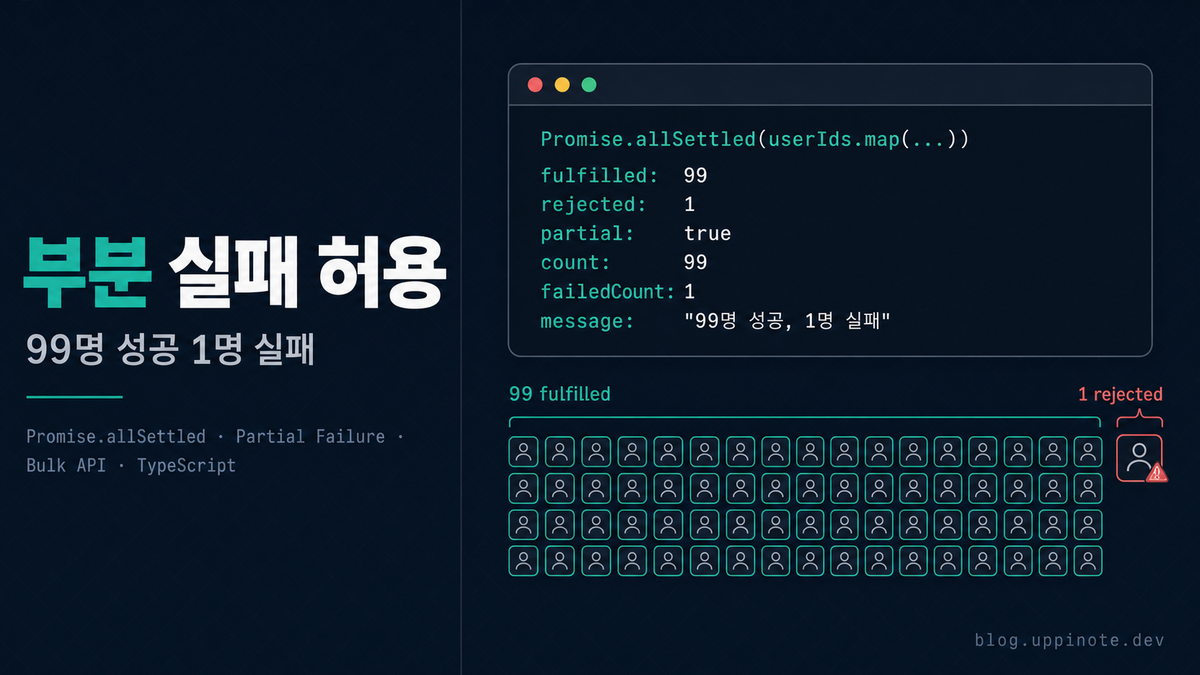
| 100명 중 1명 실패 | 99명 성공, 1명 실패 | 100명 전체 실패 |
| 에러 메시지 | "99명 성공, 1명 실패" | "처리 중 오류 발생" |
| 데이터 상태 | 99명 데이터 저장됨 | 아무것도 저장 안 됨 |
2. 원인 분석
Promise.all의 동작 방식
// ❌ Promise.all: 하나라도 실패하면 전체 실패
const results = await Promise.all([
  processUser(user1),  // 성공
  processUser(user2),  // 성공
  processUser(user3),  // 실패! → 전체 reject
  processUser(user4),  // 실행되지만 결과 무시
]);
// → Uncaught Error (user3의 에러)
핵심 동작:
- 모든 Promise를 병렬로 시작
- 하나라도 reject되면 즉시 전체 reject
- 다른 Promise들은 계속 실행되지만 결과는 무시
Promise.all의 문제점 시각화
Promise.all([p1, p2, p3, p4])

p1: ──────────────────► resolve(1)
p2: ────────────► resolve(2)
p3: ────► reject(error) ──────┐
p4: ──────────────────────► resolve(4) (결과 무시)
                              │
                              ▼
               전체 결과: reject(error)
기존 코드의 문제점
// ❌ Before: 하나라도 실패하면 전체 실패
export async function POST(request: NextRequest) {
  const { userIds } = await request.json();

  const results = await Promise.all(
    userIds.map(async (userId) => {
      // 각 사용자별 처리
      const data = await calculateData(userId);
      return prisma.record.create({ data });
    })
  );

  return NextResponse.json({
    success: true,
    count: results.length,
  });
}
이 코드의 문제:
- 1명이라도 실패하면 전체 실패
- 어떤 사용자가 실패했는지 알 수 없음
- 성공한 사용자들의 데이터도 반환되지 않음
3. 해결 방법
Promise.allSettled 소개
ES2020에서 도입된 Promise.allSettled는 모든 Promise가 settled(이행 또는 거부)될 때까지 기다립니다.
const results = await Promise.allSettled([
  Promise.resolve(1),
  Promise.reject(new Error('실패')),
  Promise.resolve(3),
]);

// results:
// [
//   { status: 'fulfilled', value: 1 },
//   { status: 'rejected', reason: Error('실패') },
//   { status: 'fulfilled', value: 3 },
// ]
Step 1: Promise.allSettled 적용
// ✅ After: 부분 실패 허용
export async function POST(request: NextRequest) {
  const { userIds } = await request.json();

  // Promise.allSettled로 변경
  const results = await Promise.allSettled(
    userIds.map(async (userId) => {
      const data = await calculateData(userId);
      const record = await prisma.record.create({ data });
      return { userId, recordId: record.id };
    })
  );

  // 결과 분류는 Step 2에서...
}
Step 2: 성공/실패 결과 분류
// 타입 가드를 사용한 결과 분류
const succeeded = results.filter(
  (r): r is PromiseFulfilledResult<{ userId: string; recordId: string }> =>
    r.status === 'fulfilled'
);

const failed = results.filter(
  (r): r is PromiseRejectedResult => r.status === 'rejected'
);
Step 3: 상황별 응답 처리
// 모두 실패한 경우
if (succeeded.length === 0) {
  const errorId = crypto.randomUUID().slice(0, 8);
  console.error('All operations failed:', {
    errorId,
    failures: failed.map((f) => f.reason?.message || String(f.reason)),
    timestamp: new Date().toISOString(),
  });
  return NextResponse.json(
    { error: '처리에 실패했습니다.', errorId },
    { status: 500 }
  );
}

// 일부 실패한 경우: 경고와 함께 성공 반환
if (failed.length > 0) {
  const errorId = crypto.randomUUID().slice(0, 8);
  console.warn('Partial failure:', {
    errorId,
    successCount: succeeded.length,
    failureCount: failed.length,
    failures: failed.map((f) => f.reason?.message || String(f.reason)),
    timestamp: new Date().toISOString(),
  });
  return NextResponse.json({
    success: true,
    partial: true,
    count: succeeded.length,
    failedCount: failed.length,
    errorId,
    message: `${succeeded.length}명 성공, ${failed.length}명 실패`,
  });
}

// 모두 성공한 경우
return NextResponse.json({
  success: true,
  count: succeeded.length,
  message: `${succeeded.length}명이 처리되었습니다.`,
});
전체 코드
export async function POST(request: NextRequest) {
  try {
    const session = await auth();
    if (!session?.user) {
      return NextResponse.json({ error: '인증이 필요합니다.' }, { status: 401 });
    }

    const { userIds } = await request.json();

    if (!userIds || userIds.length === 0) {
      return NextResponse.json(
        { error: '대상이 없습니다.' },
        { status: 400 }
      );
    }

    // Promise.allSettled로 부분 실패 허용
    const results = await Promise.allSettled(
      userIds.map(async (userId: string) => {
        const data = await calculateData(userId);

        const record = await prisma.record.upsert({
          where: { userId },
          create: { userId, ...data },
          update: { ...data },
        });

        return { userId, recordId: record.id };
      })
    );

    // 성공/실패 분류
    const succeeded = results.filter(
      (r): r is PromiseFulfilledResult<{ userId: string; recordId: string }> =>
        r.status === 'fulfilled'
    );
    const failed = results.filter(
      (r): r is PromiseRejectedResult => r.status === 'rejected'
    );

    // 모두 실패
    if (succeeded.length === 0) {
      const errorId = crypto.randomUUID().slice(0, 8);
      console.error('Bulk operation all failed:', {
        errorId,
        failures: failed.map((f) => f.reason?.message || String(f.reason)),
        timestamp: new Date().toISOString(),
      });
      return NextResponse.json(
        { error: '처리에 실패했습니다.', errorId },
        { status: 500 }
      );
    }

    // 일부 실패
    if (failed.length > 0) {
      const errorId = crypto.randomUUID().slice(0, 8);
      console.warn('Bulk operation partial failure:', {
        errorId,
        successCount: succeeded.length,
        failureCount: failed.length,
        failures: failed.map((f) => f.reason?.message || String(f.reason)),
        timestamp: new Date().toISOString(),
      });
      return NextResponse.json({
        success: true,
        partial: true,
        count: succeeded.length,
        failedCount: failed.length,
        errorId,
        message: `${succeeded.length}명 성공, ${failed.length}명 실패`,
      });
    }

    // 모두 성공
    return NextResponse.json({
      success: true,
      count: succeeded.length,
      message: `${succeeded.length}명이 처리되었습니다.`,
    });
  } catch (error) {
    const errorId = crypto.randomUUID().slice(0, 8);
    console.error('Bulk operation error:', {
      errorId,
      error: error instanceof Error ? error.message : String(error),
      timestamp: new Date().toISOString(),
    });
    return NextResponse.json(
      { error: '서버 오류가 발생했습니다.', errorId },
      { status: 500 }
    );
  }
}
4. 핵심 개념 정리
Promise.all vs Promise.allSettled 비교
| 특성 | Promise.all | Promise.allSettled |
|---|---|---|
| 실패 시 동작 | 즉시 reject | 모든 Promise 완료 대기 |
| 반환값 | T[] |
PromiseSettledResult<T>[] |
| 부분 실패 | 전체 실패로 처리 | 개별 결과 확인 가능 |
| 에러 정보 | 첫 번째 에러만 | 모든 에러 수집 가능 |
| 사용 사례 | 모두 성공해야 하는 경우 | 부분 성공 허용 |
PromiseSettledResult 타입
type PromiseSettledResult<T> =
  | PromiseFulfilledResult<T>
  | PromiseRejectedResult;

interface PromiseFulfilledResult<T> {
  status: 'fulfilled';
  value: T;
}

interface PromiseRejectedResult {
  status: 'rejected';
  reason: any;
}
타입 가드 패턴
// 타입 가드 함수
function isFulfilled<T>(
  result: PromiseSettledResult<T>
): result is PromiseFulfilledResult<T> {
  return result.status === 'fulfilled';
}

function isRejected(
  result: PromiseSettledResult<unknown>
): result is PromiseRejectedResult {
  return result.status === 'rejected';
}

// 사용
const succeeded = results.filter(isFulfilled);
const failed = results.filter(isRejected);
API 응답 설계
// 성공 응답 타입
interface BulkOperationResponse {
  success: boolean;
  partial?: boolean;      // 부분 성공 여부
  count: number;          // 성공 건수
  failedCount?: number;   // 실패 건수
  errorId?: string;       // 로그 추적용
  message: string;        // 사용자 메시지
}
5. 베스트 프랙티스
체크리스트
- [ ] 벌크 처리에서
Promise.allSettled사용 검토 - [ ] 성공/실패 결과를 타입 가드로 분류
- [ ] 부분 실패 시
partial: true플래그 반환 - [ ] 에러 로깅에
errorId포함 (추적용) - [ ] 프론트엔드에서 부분 실패 UI 처리
언제 Promise.all을 사용해야 하나?
// ✅ Promise.all이 적합한 경우

// 1. 모두 성공해야만 의미가 있는 경우
const [user, profile, settings] = await Promise.all([
  fetchUser(id),
  fetchProfile(id),
  fetchSettings(id),
]);

// 2. 트랜잭션처럼 원자성이 필요한 경우
// (하나라도 실패하면 전체 롤백)
await prisma.$transaction([
  prisma.order.create(...),
  prisma.inventory.update(...),
]);

// 3. 의존 관계가 있는 병렬 처리
const [a, b] = await Promise.all([fetchA(), fetchB()]);
const c = processWithAB(a, b); // a, b 둘 다 필요
언제 Promise.allSettled를 사용해야 하나?
// ✅ Promise.allSettled가 적합한 경우

// 1. 벌크 처리 (대량 데이터)
const results = await Promise.allSettled(
  users.map((user) => sendEmail(user))
);

// 2. 독립적인 작업들
const results = await Promise.allSettled([
  fetchFromServiceA(),
  fetchFromServiceB(),
  fetchFromServiceC(),
]);
// 일부 서비스가 다운되어도 나머지는 사용 가능

// 3. 최선의 노력(Best-effort) 처리
const results = await Promise.allSettled(
  notifications.map((n) => sendNotification(n))
);
// 일부 알림 실패해도 나머지는 전송
프론트엔드에서 부분 실패 처리
// API 호출
const response = await fetch('/api/bulk-create', {
  method: 'POST',
  body: JSON.stringify({ userIds }),
});

const data = await response.json();

// 부분 실패 처리
if (data.partial) {
  toast.warning(
    `${data.count}명 처리 완료, ${data.failedCount}명 실패\n` +
    `문의 시 오류 ID를 알려주세요: ${data.errorId}`
  );
} else if (data.success) {
  toast.success(data.message);
} else {
  toast.error(data.error);
}
로깅 패턴
// 구조화된 로깅
console.warn('Bulk operation partial failure:', {
  errorId,                                    // 추적용 ID
  operation: 'createRecords',                 // 작업 유형
  successCount: succeeded.length,
  failureCount: failed.length,
  failures: failed.map((f) => ({
    reason: f.reason?.message || String(f.reason),
    // 필요 시 추가 정보
  })),
  userId: session.user.id,                    // 요청자
  timestamp: new Date().toISOString(),
});
6. FAQ
Q: Promise.allSettled는 ES2020인데, 이전 버전에서 사용할 수 있나요?
A: Node.js 12.9.0 이상, 대부분의 모던 브라우저에서 지원합니다. 이전 버전이 필요하다면 폴리필을 사용하세요:
// 폴리필 (필요한 경우)
if (!Promise.allSettled) {
  Promise.allSettled = function <T>(
    promises: Iterable<Promise<T>>
  ): Promise<PromiseSettledResult<T>[]> {
    return Promise.all(
      Array.from(promises).map((p) =>
        Promise.resolve(p).then(
          (value) => ({ status: 'fulfilled' as const, value }),
          (reason) => ({ status: 'rejected' as const, reason })
        )
      )
    );
  };
}
Q: Promise.allSettled에서 에러 reason의 타입이 any인 이유는?
A: JavaScript에서는 어떤 값이든 throw할 수 있기 때문입니다:
throw new Error('에러');     // Error 객체
throw '문자열 에러';         // 문자열
throw 123;                   // 숫자
throw { code: 'ERR' };       // 객체
안전하게 처리하려면:
const errorMessage = failed.map((f) => {
  if (f.reason instanceof Error) {
    return f.reason.message;
  }
  return String(f.reason);
});
Q: Promise.all과 Promise.allSettled의 성능 차이가 있나요?
A: 거의 없습니다. 둘 다 모든 Promise를 병렬로 시작합니다.
차이점:
Promise.all: 첫 번째 실패 시 바로 reject (결과를 기다리지 않음)Promise.allSettled: 모든 Promise가 완료될 때까지 대기
실제로 모든 Promise가 성공하는 경우 동일한 시간이 걸립니다.
Q: 부분 실패 시 재시도 로직은 어떻게 구현하나요?
A: 실패한 항목만 재시도:
async function bulkProcessWithRetry<T>(
  items: T[],
  processor: (item: T) => Promise<void>,
  maxRetries = 3
): Promise<{ succeeded: T[]; failed: T[] }> {
  let pending = items;
  const succeeded: T[] = [];
  const failed: T[] = [];

  for (let attempt = 0; attempt < maxRetries && pending.length > 0; attempt++) {
    const results = await Promise.allSettled(pending.map(processor));

    const currentFailed: T[] = [];

    results.forEach((result, index) => {
      if (result.status === 'fulfilled') {
        succeeded.push(pending[index]);
      } else {
        currentFailed.push(pending[index]);
      }
    });

    pending = currentFailed;

    if (attempt < maxRetries - 1 && pending.length > 0) {
      // 재시도 전 대기 (exponential backoff)
      await new Promise((r) => setTimeout(r, Math.pow(2, attempt) * 1000));
    }
  }

  failed.push(...pending);
  return { succeeded, failed };
}
Q: 동시성 제한(Concurrency Limit)과 함께 사용하려면?
A: p-limit 같은 라이브러리를 사용하거나 직접 구현:
import pLimit from 'p-limit';

const limit = pLimit(10); // 동시 10개까지

const results = await Promise.allSettled(
  userIds.map((userId) =>
    limit(() => processUser(userId)) // 동시성 제한 적용
  )
);
7. 참고 자료
- MDN Promise.allSettled
- TC39 Promise.allSettled Proposal
- Node.js Promise API
- p-limit - Concurrency Limiter
8. 다음 단계
벌크 처리에서 부분 실패를 허용하게 되었다면, 에러 추적 시스템과 함께 사용해보세요.
시리즈 목차:
- Promise.all vs Promise.allSettled: 부분 실패를 허용하는 벌크 처리 ← 현재 글
- API 에러 추적 개선하기: errorId 패턴으로 디버깅 시간 단축