1. 문제 상황
블로그 글이 쌓이면 생기는 문제
예약 발행 기능으로 블로그 글을 미리 작성해두면 편합니다. 그런데 글이 10개, 20개 쌓이면 새로운 문제가 생깁니다.
현재 예약된 글:
1/28 - 플로팅 목차 만들기
1/29 - Ubuntu 서버 보안
1/30 - Ghost 수익화
2/02 - Ghost 예약 발행
...
여기서 새 글을 1/28에 끼워넣고 싶다면?
Ghost Admin에서 하나씩 날짜를 바꿔야 합니다. 글이 12개면 12번 클릭. 실수로 같은 날짜에 두 글을 예약하면 충돌.
추가로 하고 싶은 것들
- 예약된 글 전체 목록 확인 - 한눈에 스케줄 파악
- 말투 일관성 검수 - 존댓말/반말 혼용 검사
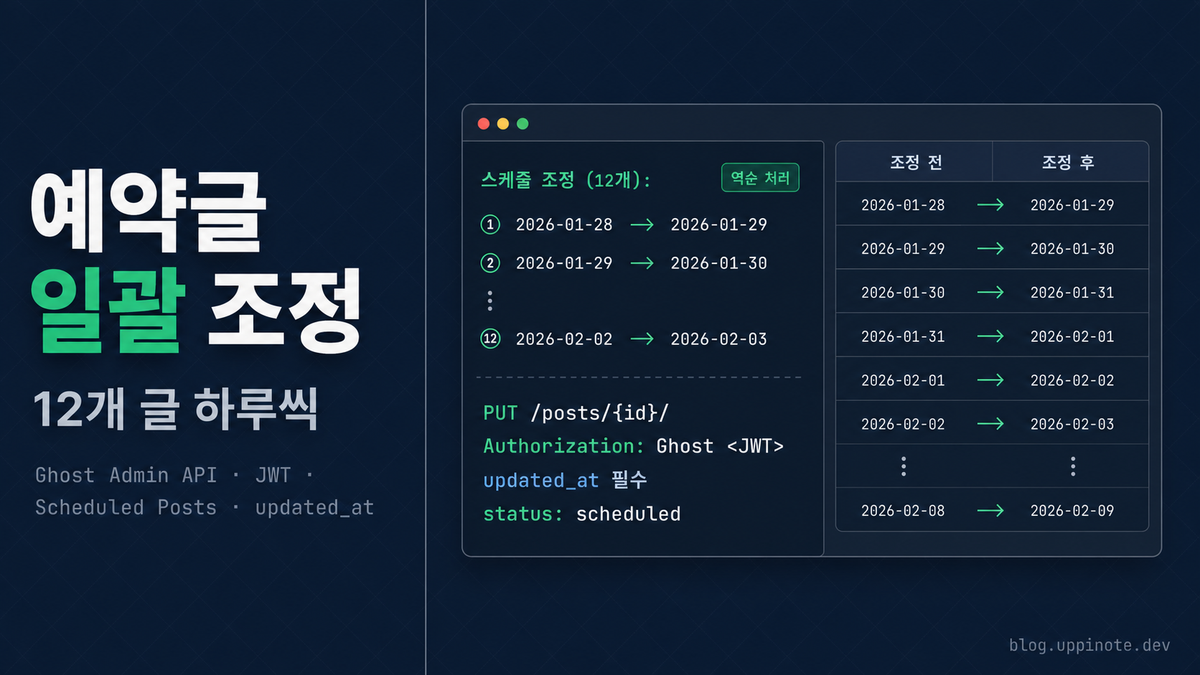
- 스케줄 일괄 조정 - 새 글 삽입 시 나머지 하루씩 밀기
- 태그 현황 파악 - 어떤 태그가 몇 개 글에 사용됐는지
Ghost Admin UI로는 하나씩 수동으로 해야 합니다. API를 쓰면 스크립트 한 번 실행으로 끝.
2. 원인 분석 (Ghost Admin API 이해하기)
Ghost API 종류
Ghost는 두 가지 API를 제공합니다.
| API | 용도 | 인증 |
|---|---|---|
| Content API | 공개 콘텐츠 읽기 (블로그 프론트엔드용) | API Key |
| Admin API | 콘텐츠 관리 (CRUD, 설정 변경) | JWT |
Content API는 발행된 글만 읽을 수 있습니다. 예약글, 초안 관리는 Admin API가 필요합니다.
Admin API 인증 방식
Admin API는 JWT(JSON Web Token) 인증을 사용합니다. API Key를 그대로 보내는 게 아니라, 서명된 토큰을 생성해서 보내야 합니다.
API Key 형식:
{id}:{secret}
이 키로 JWT를 생성해서 Authorization: Ghost {token} 헤더에 담아 보냅니다.
API Key 발급 위치
Ghost Admin → Settings → Integrations → + Add custom integration
Integration을 만들면 Admin API Key가 생성됩니다. Content API Key도 같이 생성되는데, 이건 공개 콘텐츠 읽기용입니다.
3. 해결 방법
Step 1: JWT 토큰 생성
Ghost Admin API 호출에 필요한 JWT 토큰 생성 코드입니다.
const crypto = require('crypto');

// API Key (Ghost Admin → Settings → Integrations에서 확인)
const API_KEY = '{your-api-key}';  // {id}:{secret} 형식
const [id, secret] = API_KEY.split(':');

function generateToken() {
  // JWT 헤더
  const header = {
    alg: 'HS256',  // 알고리즘
    typ: 'JWT',
    kid: id        // ← API Key의 id 부분
  };

  // JWT 페이로드
  const now = Math.floor(Date.now() / 1000);
  const payload = {
    iat: now,           // 발급 시간
    exp: now + 300,     // 만료 시간 (5분)
    aud: '/admin/'      // 대상 (Admin API)
  };

  // Base64URL 인코딩 함수
  const base64url = (obj) => Buffer.from(JSON.stringify(obj)).toString('base64url');

  const headerB64 = base64url(header);
  const payloadB64 = base64url(payload);

  // HMAC-SHA256 서명 (secret은 hex 디코딩 필요)
  const hmac = crypto.createHmac('sha256', Buffer.from(secret, 'hex'));
  hmac.update(headerB64 + '.' + payloadB64);
  const signature = hmac.digest('base64url');

  return headerB64 + '.' + payloadB64 + '.' + signature;
}

const token = generateToken();
console.log(token);
// eyJhbGciOiJIUzI1NiIsInR5cCI6IkpXVCIsImtpZCI6IjY5NzQ2YmI1Yzc0MTYxMDAwMWE4ZGFkNCJ9...
핵심 포인트:
kid필드에 API Key의 id 부분을 넣어야 합니다secret은 hex 문자열이므로Buffer.from(secret, 'hex')로 디코딩- 토큰 유효시간은 5분이면 충분합니다
Step 2: API 요청 함수 만들기
토큰 생성과 HTTP 요청을 묶은 재사용 가능한 함수입니다.
const https = require('https');

const GHOST_URL = 'your-blog.ghost.io';  // 본인 블로그 URL

function apiRequest(method, path, body = null) {
  return new Promise((resolve, reject) => {
    const token = generateToken();  // 매 요청마다 새 토큰 생성

    const options = {
      hostname: GHOST_URL,
      path: '/ghost/api/admin' + path,
      method,
      headers: {
        'Authorization': 'Ghost ' + token,  // ← "Ghost " 접두사 필수
        'Content-Type': 'application/json'
      }
    };

    const req = https.request(options, (res) => {
      let data = '';
      res.on('data', chunk => data += chunk);
      res.on('end', () => {
        try {
          resolve(JSON.parse(data));
        } catch (e) {
          resolve(data);
        }
      });
    });

    req.on('error', reject);
    if (body) req.write(JSON.stringify(body));
    req.end();
  });
}
주의: Authorization 헤더는 Bearer가 아니라 Ghost입니다.
✗ Authorization: Bearer eyJhbG...
✓ Authorization: Ghost eyJhbG...
Step 3: 예약된 글 목록 조회
async function getScheduledPosts() {
  const result = await apiRequest('GET',
    '/posts/?status=scheduled&limit=all&fields=id,title,published_at,updated_at,slug'
  );

  // 발행일 기준 정렬
  const posts = result.posts.sort((a, b) =>
    new Date(a.published_at) - new Date(b.published_at)
  );

  console.log('예약된 글 (' + posts.length + '개):');
  posts.forEach(p => {
    const d = new Date(p.published_at);
    const weekday = ['일', '월', '화', '수', '목', '금', '토'][d.getUTCDay()];
    console.log('  ' + d.toISOString().slice(0,10) + ' (' + weekday + ') - ' + p.title);
  });

  return posts;
}
쿼리 파라미터 설명:
| 파라미터 | 설명 | 예시 |
|---|---|---|
status |
글 상태 필터 | published, scheduled, draft |
limit |
결과 수 | all, 10, 50 |
fields |
반환할 필드 (쉼표 구분) | id,title,published_at |
formats |
콘텐츠 포맷 | mobiledoc, html, plaintext |
include |
관계 데이터 포함 | tags, authors |
출력 예시:
예약된 글 (12개):
  2026-01-27 (화) - Ghost 블로그 Analytics 설정 완벽 가이드
  2026-01-28 (수) - Tailscale + SSH로 아이폰에서 맥 원격 접속하기
  2026-01-29 (목) - Ghost 블로그에 플로팅 목차(TOC) 만들기
  2026-01-30 (금) - Ubuntu 서버 보안 강화 완전 가이드
  2026-02-02 (월) - 한국에서 Ghost 블로그 수익화하기
  ...
Step 4: 태그 목록 조회
async function getTags() {
  const result = await apiRequest('GET', '/tags/?limit=all');

  console.log('태그 목록:');
  result.tags.forEach(t => {
    console.log('  - ' + t.name + ' (slug: ' + t.slug + ', id: ' + t.id + ')');
  });

  return result.tags;
}
태그 ID는 글에 태그를 지정할 때 필요합니다.
Step 5: 글 콘텐츠 가져오기 (말투 검수용)
Ghost는 콘텐츠를 Mobiledoc 포맷으로 저장합니다. 마크다운 블록에서 텍스트를 추출해야 합니다.
async function getPostContent(postId) {
  const result = await apiRequest('GET', '/posts/' + postId + '/?formats=mobiledoc');
  const post = result.posts[0];

  // Mobiledoc에서 마크다운 텍스트 추출
  const mobiledoc = JSON.parse(post.mobiledoc);
  let content = '';

  for (const card of (mobiledoc.cards || [])) {
    if (card[0] === 'markdown') {
      content += card[1].markdown || '';
    }
  }

  return content;
}
Mobiledoc 구조:
{
  "version": "0.3.1",
  "atoms": [],
  "cards": [
    ["markdown", { "markdown": "# 제목\n\n본문 내용..." }],
    ["image", { "src": "https://...", "alt": "이미지 설명" }]
  ],
  "markups": [],
  "sections": [[10, 0], [10, 1]]
}
카드 타입:
markdown: 마크다운 블록image: 이미지code: 코드 블록html: HTML 블록embed: 임베드 (YouTube, Twitter 등)
Step 6: 말투 일관성 검사
존댓말/반말 혼용을 검사하는 함수입니다.
async function checkTone(posts) {
  // 반말 패턴 (문장 끝)
  const casualPatterns = [
    { pattern: /있다\./g, fix: '있습니다.' },
    { pattern: /없다\./g, fix: '없습니다.' },
    { pattern: /된다\./g, fix: '됩니다.' },
    { pattern: /한다\./g, fix: '합니다.' },
    { pattern: /이다\./g, fix: '입니다.' },
    { pattern: /하자\./g, fix: '합시다.' },
    { pattern: /보자\./g, fix: '봅시다.' },
  ];

  for (const post of posts) {
    const content = await getPostContent(post.id);
    const issues = [];

    // 코드 블록 제외한 텍스트만 검사
    const textOnly = content.replace(/```[\s\S]*?```/g, '');

    casualPatterns.forEach(({ pattern, fix }) => {
      const matches = textOnly.match(pattern);
      if (matches) {
        issues.push({
          found: matches[0],
          suggestion: fix,
          count: matches.length
        });
      }
    });

    if (issues.length > 0) {
      console.log('\n[반말 발견] ' + post.title);
      issues.forEach(i => {
        console.log('  ' + i.found + ' → ' + i.suggestion + ' (' + i.count + '회)');
      });
    }
  }
}
출력 예시:
[반말 발견] Tailscale + SSH로 아이폰에서 맥 원격 접속하기
  있다. → 있습니다. (3회)
  한다. → 합니다. (2회)
  이다. → 입니다. (1회)
Step 7: 스케줄 일괄 조정 (하루씩 밀기)
새 글을 특정 날짜에 끼워넣고, 그 이후 글들을 하루씩 미루는 함수입니다.
async function adjustSchedule(fromDate) {
  const posts = await getScheduledPosts();

  // fromDate 이후 글만 필터
  const toAdjust = posts.filter(p =>
    new Date(p.published_at) >= new Date(fromDate)
  );

  // 역순으로 조정 (날짜 충돌 방지)
  toAdjust.reverse();

  console.log('\n스케줄 조정 (' + toAdjust.length + '개):');

  for (const post of toAdjust) {
    const oldDate = new Date(post.published_at);
    let newDate = new Date(oldDate);
    newDate.setDate(newDate.getDate() + 1);  // 하루 뒤로

    // 주말이면 월요일로 (선택사항)
    if (newDate.getDay() === 0) newDate.setDate(newDate.getDate() + 1);  // 일→월
    if (newDate.getDay() === 6) newDate.setDate(newDate.getDate() + 2);  // 토→월

    console.log('  ' + oldDate.toISOString().slice(0,10) +
                ' → ' + newDate.toISOString().slice(0,10) +
                ' : ' + post.title.slice(0,30));

    // API로 업데이트
    const result = await apiRequest('PUT', '/posts/' + post.id + '/', {
      posts: [{
        published_at: newDate.toISOString(),
        updated_at: post.updated_at  // ← 필수! 충돌 방지용
      }]
    });

    if (result.errors) {
      console.log('    ERROR: ' + result.errors[0].message);
    } else {
      console.log('    OK');
    }
  }
}
핵심 포인트:
- 역순 처리: 2/11 → 2/10 → 2/09 순서로 밀어야 날짜 충돌이 안 생깁니다
- updated_at 필수: 글 수정 시 현재
updated_at값을 함께 보내야 합니다. Ghost가 동시 수정 충돌을 방지하는 방식입니다 - 주말 건너뛰기: 평일만 발행하려면 토/일 체크 로직 추가
Step 8: 새 글 예약 발행
초안 상태의 글을 특정 날짜에 예약 발행하는 함수입니다.
async function schedulePost(postId, publishDate, tagIds = []) {
  // 현재 글 정보 가져오기 (updated_at 필요)
  const current = await apiRequest('GET', '/posts/' + postId + '/');
  const post = current.posts[0];

  console.log('예약 발행 설정:');
  console.log('  제목: ' + post.title);
  console.log('  현재 상태: ' + post.status);
  console.log('  예약일: ' + publishDate);

  // 예약 발행으로 변경
  const result = await apiRequest('PUT', '/posts/' + postId + '/', {
    posts: [{
      status: 'scheduled',
      published_at: new Date(publishDate).toISOString(),
      updated_at: post.updated_at,
      tags: tagIds.map(id => ({ id }))  // 태그 지정 (선택)
    }]
  });

  if (result.errors) {
    console.log('ERROR: ' + result.errors[0].message);
  } else {
    console.log('OK - 예약 완료');
  }
}

// 사용 예시
schedulePost(
  '697778da9f8fa30001d1a3dc',           // 글 ID
  '2026-01-28T00:00:58.000Z',            // 발행일 (UTC)
  ['69761ecdc741610001a8db18']           // 태그 ID (인프라)
);
Step 9: 전체 워크플로우 스크립트
위 함수들을 조합한 전체 스크립트입니다.
const crypto = require('crypto');
const https = require('https');

// === 설정 ===
const API_KEY = '{your-api-key}';  // {id}:{secret} 형식
const GHOST_URL = 'your-blog.ghost.io';  // 본인 블로그 URL
const [id, secret] = API_KEY.split(':');

// === JWT 토큰 생성 ===
function generateToken() {
  const header = { alg: 'HS256', typ: 'JWT', kid: id };
  const now = Math.floor(Date.now() / 1000);
  const payload = { iat: now, exp: now + 300, aud: '/admin/' };
  const base64url = (obj) => Buffer.from(JSON.stringify(obj)).toString('base64url');
  const headerB64 = base64url(header);
  const payloadB64 = base64url(payload);
  const hmac = crypto.createHmac('sha256', Buffer.from(secret, 'hex'));
  hmac.update(headerB64 + '.' + payloadB64);
  return headerB64 + '.' + payloadB64 + '.' + hmac.digest('base64url');
}

// === API 요청 ===
function apiRequest(method, path, body = null) {
  return new Promise((resolve, reject) => {
    const token = generateToken();
    const options = {
      hostname: GHOST_URL,
      path: '/ghost/api/admin' + path,
      method,
      headers: {
        'Authorization': 'Ghost ' + token,
        'Content-Type': 'application/json'
      }
    };
    const req = https.request(options, (res) => {
      let data = '';
      res.on('data', chunk => data += chunk);
      res.on('end', () => resolve(JSON.parse(data)));
    });
    req.on('error', reject);
    if (body) req.write(JSON.stringify(body));
    req.end();
  });
}

// === 메인 워크플로우 ===
async function main() {
  console.log('=== Ghost 블로그 관리 스크립트 ===\n');

  // 1. 현재 예약된 글 확인
  console.log('1. 예약된 글 목록');
  const posts = await getScheduledPosts();

  // 2. 태그 목록 확인
  console.log('\n2. 태그 목록');
  const tags = await getTags();

  // 3. 말투 검수 (선택)
  console.log('\n3. 말투 검수');
  await checkTone(posts);

  // 4. 스케줄 조정 (선택)
  // await adjustSchedule('2026-01-28');

  // 5. 새 글 예약 (선택)
  // await schedulePost('post-id', '2026-01-28T00:00:00Z', ['tag-id']);

  console.log('\n=== 완료 ===');
}

main().catch(console.error);
4. 핵심 개념 정리
Ghost Admin API 엔드포인트
| 엔드포인트 | 메서드 | 설명 |
|---|---|---|
/posts/ |
GET | 글 목록 조회 |
/posts/{id}/ |
GET | 글 상세 조회 |
/posts/{id}/ |
PUT | 글 수정 |
/posts/ |
POST | 글 생성 |
/posts/{id}/ |
DELETE | 글 삭제 |
/tags/ |
GET | 태그 목록 |
/members/ |
GET | 멤버 목록 |
/images/upload/ |
POST | 이미지 업로드 |
글 상태 (status)
| 상태 | 설명 |
|---|---|
draft |
초안 (비공개) |
scheduled |
예약 발행 |
published |
발행됨 |
sent |
이메일 발송됨 |
자주 쓰는 쿼리 파라미터
# 예약글만, 모든 필드
/posts/?status=scheduled&limit=all

# 특정 필드만 (응답 크기 줄이기)
/posts/?fields=id,title,published_at,slug

# 태그, 작성자 정보 포함
/posts/?include=tags,authors

# 콘텐츠 포맷 지정
/posts/{id}/?formats=mobiledoc
/posts/{id}/?formats=html
/posts/{id}/?formats=plaintext

# 고급 필터
/posts/?filter=tag:ghost+published_at:>'2026-01-01'
JWT vs API Key 차이
| 항목 | Content API | Admin API |
|---|---|---|
| 인증 방식 | API Key 직접 전송 | JWT 토큰 |
| 헤더 | ?key={api_key} (쿼리) |
Authorization: Ghost {jwt} |
| 권한 | 읽기 전용 | 전체 CRUD |
| 대상 콘텐츠 | 공개 글만 | 모든 글 (초안, 예약 포함) |
5. 베스트 프랙티스
API 사용 시 체크리스트
□ Integration 생성 후 Admin API Key 복사
□ JWT 토큰 만료 시간 적절히 설정 (5분 권장)
□ Authorization 헤더에 "Ghost " 접두사 확인
□ PUT 요청 시 updated_at 필드 포함
□ 날짜 조정은 역순으로 (충돌 방지)
□ 에러 응답 확인 후 재시도 로직 추가
보안 주의사항
□ API Key는 환경변수나 설정 파일로 분리
□ 코드에 API Key 하드코딩 금지
□ .gitignore에 설정 파일 추가
□ 프로덕션 블로그에 테스트 전 스테이징에서 먼저 확인
스케줄 조정 전략
- 역순 처리: 마지막 날짜부터 조정해야 충돌 없음
- 주말 건너뛰기: 평일 발행이면 토/일 → 월요일로
- 시간대 주의: Ghost는 UTC 기준, 한국은 KST(+9시간)
- 드라이런 먼저: 실제 업데이트 전 콘솔 출력으로 확인
6. FAQ
Q: API Key가 노출되면 어떻게 되나요?
A: Admin API Key가 노출되면 블로그 전체 콘텐츠에 대한 CRUD 권한이 탈취됩니다. 즉시 Ghost Admin → Settings → Integrations에서 해당 Integration을 삭제하고 새로 만드세요.
Q: JWT 토큰 유효시간은 얼마가 적당한가요?
A: 5분(300초)이면 충분합니다. 매 API 요청마다 새 토큰을 생성하므로 길게 잡을 필요가 없습니다. 최대 24시간까지 설정 가능하지만 보안상 짧게 유지하는 게 좋습니다.
Q: updated_at을 왜 보내야 하나요?
A: Ghost의 동시 수정 충돌 방지 메커니즘입니다. 다른 사람(또는 다른 스크립트)이 먼저 글을 수정했다면, 내가 가진 updated_at과 서버의 값이 다르므로 요청이 거부됩니다. 이를 통해 덮어쓰기 사고를 방지합니다.
Q: 예약 시간을 UTC가 아닌 KST로 지정할 수 있나요?
A: API는 UTC만 받습니다. 스크립트에서 KST → UTC 변환이 필요합니다.
// KST 오전 9시 → UTC 자정
const kst = new Date('2026-01-28T09:00:00+09:00');
const utc = kst.toISOString();  // 2026-01-28T00:00:00.000Z
Q: 발행된 글의 날짜도 바꿀 수 있나요?
A: 네, 가능합니다. 하지만 이미 발행된 글의 published_at을 바꾸면 RSS 피드나 검색엔진 인덱스에 혼란을 줄 수 있으니 주의하세요.
7. 참고 자료
8. 다음 단계
이번 시리즈에서는 n8n 기본 설정부터 Claude Code 연동, 그리고 API 직접 호출까지 다뤘습니다. 이제 블로그 운영의 대부분을 자동화할 수 있습니다.
시리즈 목차:
- n8n으로 블로그 자동화 구축하기: Ghost 연동부터 실전 워크플로우까지
- Claude Code Hooks로 블로그 글 자동 전송하기: n8n Webhook 연동
- Ghost Admin API로 블로그 글 일괄 관리하기 ← 현재 글